Deploy vLLM 2026 in Production: PagedAttention, Multi-GPU Sharding, and the FP8 Quantisation Tradeoffs
Install vLLM 0.20.1, serve Llama 3.1 8B, scale across GPUs with tensor parallelism, and pick FP8 vs W8A16 by hardware. A 90-minute walkthrough for ML engineers.
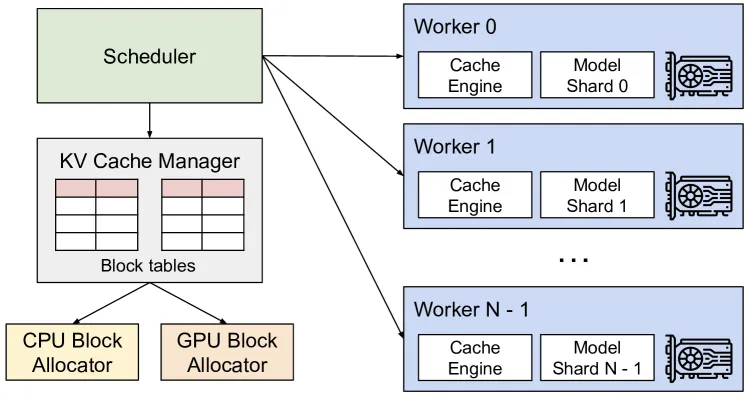
Figure 4 of Kwon et al. (arXiv:2309.06180), reproduced for editorial coverage. The vLLM system overview from the original PagedAttention paper — the architecture this tutorial deploys end-to-end.
The bottom line
vLLM is the open-source inference engine that wraps frontier-LLM serving in a single vllm serve <model> command and trades a deep config surface for the throughput gains its PagedAttention algorithm unlocks. PagedAttention is the memory-management trick at the centre of that gain: it treats the KV cache (the per-request key-value tensors that dominate GPU memory during decoding) like an OS virtual-memory page table, so the engine packs roughly two to four times as many concurrent requests onto the same hardware at matched p50 latency, per the original paper. 1 FP8 quantisation is the second lever: an eight-bit numeric format that halves model memory and lifts throughput, but only on Hopper, Ada Lovelace, and Blackwell NVIDIA silicon. This walkthrough installs vLLM 0.20.1, serves a Llama 3.1 8B baseline, scales across multiple GPUs with tensor parallelism, and picks the right quantisation flag by GPU generation. Budget about 90 minutes end-to-end if you have a CUDA box ready.
What you’ll need
A Linux box with at least one NVIDIA GPU of compute capability 7.5 or higher (Turing or newer), CUDA 12.8/12.9/13.0 installed, Python 3.10–3.13, and around 20GB of free disk for model weights. 2 A Hugging Face account and access token if you plan to pull gated models like Llama 3.1. The walkthrough uses one A100 80GB or one H100 for the single-GPU steps and four GPUs of the same class for the tensor-parallel step; smaller hardware works for the smaller-model variants noted along the way.
The decision rule, up front: deploy vLLM when you are running a self-hosted inference workload that needs more concurrency than a single PyTorch HuggingFace model.generate() loop can deliver, want an OpenAI-compatible HTTP surface so existing client code drops in unchanged, and have the GPU budget to keep weights resident in memory. Skip vLLM for batch inference jobs where latency does not matter (a shell script over transformers is simpler), for edge deployment on a single small device (llama.cpp is the right tool), or when you would rather hand the operations to a vendor (AWS Bedrock, Anyscale, Together, and Fireworks all sit on top of similar engines and absorb the operational tax).
What this tutorial builds
By the end you will have:
- A working
vllm serveprocess exposing an OpenAI-compatible HTTP API onlocalhost:8000. - A Python smoke test driving the server through the OpenAI SDK without code changes.
- A multi-GPU configuration sharding a larger model across four GPUs with
--tensor-parallel-size 4. - An informed pick between FP8 W8A8 (Hopper / Ada / Blackwell) and W8A16 weight-only with Marlin kernels (Ampere fallback).
- A short list of production gotchas the docs flag (KV-cache exhaustion, OOM levers, chunked prefill constraints) with the right config knobs to reach for.
A note on version pinning
vLLM cuts a release roughly every two to three weeks. The latest tag at writing is v0.20.1, dated 4 May 2026, four days before this tutorial. 3 The v0.20.0 release a week earlier shipped breaking changes worth flagging: CUDA 13.0 became the default, PyTorch 2.11 is now bundled, Transformers v5 is required, and Ray was removed as a default distributed dependency. If you are upgrading an existing v0.18 or v0.19 deployment, run pip list against the upgrade-path notes on the releases page before pinning forward; if you are starting fresh on a clean box, the install command below resolves all of these correctly. Verify the live release tag on GitHub at the time you read this. Pin the version explicitly rather than tracking latest; an inference engine that silently changes its flag surface mid-quarter is the wrong dependency to leave unpinned.
Step 1: Install vLLM and verify CUDA
Use uv if you have it (faster resolver), pip otherwise. Pin to v0.20.1 so the rest of the tutorial reproduces:
uv pip install vllm==0.20.1 --torch-backend=autoThe --torch-backend=auto flag detects the GPU compute capability and picks the matching PyTorch wheel. 4 If you are on pip:
pip install vllm==0.20.1 --extra-index-url https://download.pytorch.org/whl/cu129Verify the install resolved correctly:
python -c "import vllm; print(vllm.__version__)"You should see 0.20.1. If you see an ImportError mentioning CUDA, re-check nvidia-smi reports a driver compatible with CUDA 12.8 or higher; if you see a version mismatch, your environment has cached an older wheel and you need to clear it before retrying.
For AMD ROCm shops, swap the install line to uv pip install vllm --extra-index-url https://wheels.vllm.ai/rocm/ --upgrade. ROCm 6.3 is the baseline; MI350 hardware needs ROCm 7.0. The rest of this tutorial works on either path; flag-naming is identical.
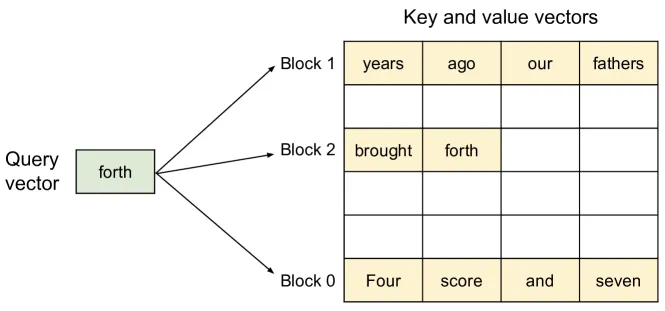
Figure 5 of Kwon et al. (arXiv:2309.06180), reproduced for editorial coverage. The PagedAttention algorithm — the memory-management trick that powers the single-GPU baseline this section walks through.
Step 2: Single-GPU baseline serve
Before serving over HTTP, run the offline LLM class to confirm the model loads and generates. This is the fastest way to catch a misconfigured GPU or a wrong model name. Save the following as baseline.py:
from vllm import LLM, SamplingParams

llm = LLM(model="meta-llama/Llama-3.1-8B-Instruct")

prompts = [
    "Explain PagedAttention in two sentences.",
    "What does --tensor-parallel-size do in vLLM?",
]
sampling_params = SamplingParams(temperature=0.8, top_p=0.95, max_tokens=200)

outputs = llm.generate(prompts, sampling_params)
for output in outputs:
    print(f"PROMPT: {output.prompt}")
    print(f"OUTPUT: {output.outputs[0].text}")
    print("---")
Run it:
python baseline.pyThe first run downloads the Llama 3.1 8B weights (about 16GB) from Hugging Face, allocates the KV cache, and prints the two completions. The Quickstart docs use facebook/opt-125m as a smoke-test model, which is fine if you have a smaller GPU; for production-realistic latency numbers, Llama 3.1 8B Instruct on a single A100 or H100 is the closest fit to what you’ll actually deploy. 5
Take note of the startup log. The line that reads something like GPU KV cache size: 643,232 tokens and Maximum concurrency for 40,960 tokens per request: 15.70x tells you how much headroom the engine has on this hardware before it starts preempting requests. The exact numbers depend on your GPU and model; what you want is for both lines to print cleanly without OOM warnings.
Step 3: OpenAI-compatible API server
The offline LLM class is useful for smoke tests, but production deployments serve over HTTP. vLLM’s vllm serve command stands up an OpenAI-compatible API surface so existing OpenAI SDK code points at your server unchanged.
vllm serve meta-llama/Llama-3.1-8B-Instruct \
  --dtype auto \
  --api-key token-abc123 \
  --port 8000
The server binds to 0.0.0.0:8000 by default and exposes the canonical OpenAI endpoints: /v1/completions, /v1/chat/completions, /v1/embeddings, plus tokenisation, audio, scoring, and a realtime WebSocket route. 6 Pass --api-key token-abc123 so requests need a bearer token; in real deployments, lift that into a secret manager rather than a CLI flag.
Test from a second shell:
curl http://localhost:8000/v1/chat/completions \
  -H "Content-Type: application/json" \
  -H "Authorization: Bearer token-abc123" \
  -d '{
    "model": "meta-llama/Llama-3.1-8B-Instruct",
    "messages": [{"role": "user", "content": "Say hello in one word."}]
  }'
The response is the OpenAI chat-completion shape your client code already parses. Drop-in: change the OpenAI SDK base_url to http://localhost:8000/v1 and the api_key to token-abc123, and your existing application targets your self-hosted vLLM without further changes.

Figure 3 of Kwon et al. (arXiv:2309.06180), reproduced for editorial coverage. The KV cache memory waste in pre-vLLM serving systems — the cost the OpenAI-compatible server flow above eliminates.
Step 4: Multi-GPU tensor parallelism
A single 8B model fits on one A100 80GB. The interesting question is what happens when the model exceeds one GPU. Tensor parallelism (TP) is the answer: vLLM shards the model weights across GPUs in the same node so each GPU holds a slice of every layer.
The flag is --tensor-parallel-size N, where N matches the number of GPUs you want to shard across. 7 A typical four-GPU configuration:
vllm serve meta-llama/Llama-3.1-70B-Instruct \
  --tensor-parallel-size 4 \
  --dtype auto \
  --api-key token-abc123
This loads Llama 3.1 70B across four GPUs in one node, with each GPU holding roughly a quarter of the weights. The serving surface is identical to the single-GPU step; only the startup line changes (tensor_parallel_size=4).
When the model exceeds one node (typically anything past 70B in BF16, or smaller models with very long context windows), combine TP within the node and pipeline parallelism (PP) across nodes:
vllm serve <large-model> \
  --tensor-parallel-size 4 \
  --pipeline-parallel-size 2
This shards the model across 4 × 2 = 8 GPUs in two nodes, with TP inside each node and PP between them. The canonical reference is the parallelism and scaling page in the docs, which the docs team reorganised distributed-serving content into during 2026; older URLs like distributed_serving.html now 404.
A short decision tree, drawn from the same page:
| Scenario | Strategy |
|---|---|
| Model fits on one GPU | No distributed inference needed |
| Model exceeds one GPU, fits on one node | Tensor parallel (TP) |
| Model exceeds one node | TP across GPUs in node + pipeline parallel (PP) across nodes |
| MoE model with sharding-friendly experts | Data parallel (DP) for expert layers |
| Uneven GPU split within a node, no NVLink | Pipeline parallel preferred over tensor parallel |
The hardware caveat for TP: it leans heavily on NVLink (or NVSwitch) bandwidth between GPUs because activations cross the interconnect on every layer. On commodity boxes where GPUs talk over PCIe, TP works but the overhead grows; PP is the friendlier choice when interconnect is the bottleneck.
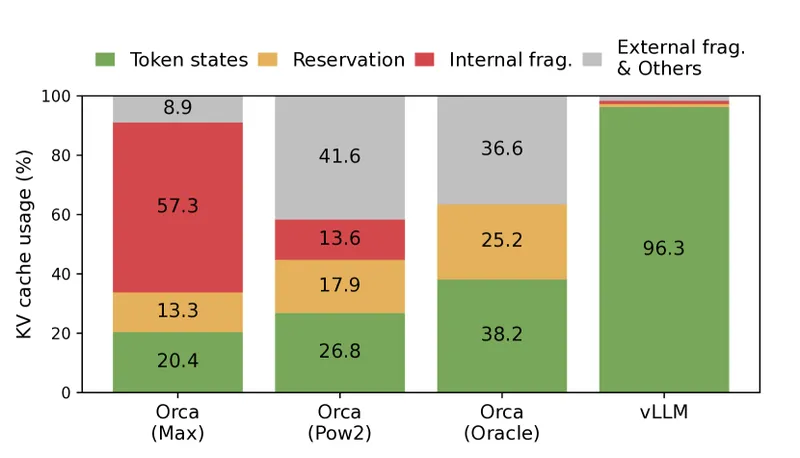
Figure 2 of Kwon et al. (arXiv:2309.06180), reproduced for editorial coverage. Memory-waste comparison across serving systems — context for why the tensor-parallel-size flag this section walks through is the right scaling lever before pipeline parallelism.
Step 5: FP8 quantisation tradeoffs
FP8 is the eight-bit floating-point format that halves model memory and lifts throughput on supported NVIDIA silicon. The flag is straightforward:
vllm serve meta-llama/Llama-3.1-70B-Instruct \
  --tensor-parallel-size 4 \
  --quantization fp8
Or in the offline LLM class:
llm = LLM("meta-llama/Llama-3.1-70B-Instruct", quantization="fp8")The hardware constraint is the load-bearing thing. FP8 W8A8 (eight-bit weights and eight-bit activations) needs NVIDIA compute capability 8.9 or higher: Hopper (H100, H200, GB200), Ada Lovelace (L40S, RTX 4090), and Blackwell. 8 Ampere shops (A100, A40, RTX 3090) sit at compute capability 8.0–8.6 and cannot run W8A8 natively. The fallback for Turing and Ampere is W8A16: weight-only FP8 quantisation paired with Marlin kernels, which gives part of the memory savings but forfeits the activation-side speedup.
The accuracy tradeoff splits two ways. Online dynamic FP8 (where activations get scaled per forward pass) keeps “minimal impact on accuracy” but the per-forward-pass scaling caps the latency improvement. Pre-quantised models (where the FP8 conversion is baked in offline) reach what the docs describe as “up to a 1.6x improvement in throughput” and “2x reduction in model memory” relative to the BF16 baseline. 9
A short pick-by-hardware:
| GPU generation | Compute capability | FP8 path | Memory saving | Throughput lift |
|---|---|---|---|---|
| Blackwell (B200, GB200) | 10.0 | W8A8 native | About 2x | Up to about 1.6x |
| Hopper (H100, H200) | 9.0 | W8A8 native | About 2x | Up to about 1.6x |
| Ada Lovelace (L40S, RTX 4090) | 8.9 | W8A8 native | About 2x | Up to about 1.6x |
| Ampere (A100, A40, RTX 3090) | 8.0–8.6 | W8A16 weight-only via Marlin | Partial (weights only) | Smaller, weight-only |
| Turing (T4, RTX 2080) | 7.5 | W8A16 weight-only via Marlin | Partial (weights only) | Smaller, weight-only |
AMD MI300x has FP8 W8A8 support listed in the quantisation index, but documentation is less mature than the NVIDIA path; if you are on AMD silicon, treat FP8 as supported-but-verify and benchmark before committing a production workload. Other quantisation flags worth knowing: --quantization gptq works on Volta and newer (broad support, GPTQ format), --quantization awq runs on Turing and newer (excludes Volta and AMD), and the Blackwell-targeted MXFP4 and NVFP4 formats appear in the API reference for the newest hardware deployments.
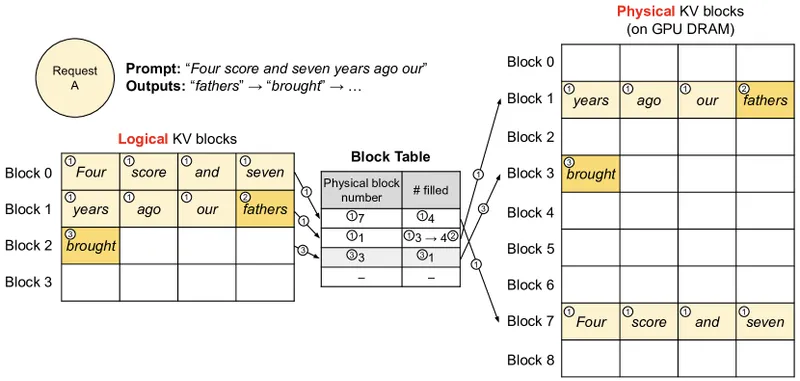
Figure 6 of Kwon et al. (arXiv:2309.06180), reproduced for editorial coverage. Block-table translation in vLLM — the memory-management foundation that FP8 quantisation reduces by half.
Step 6: Production gotchas
Five issues catch most teams in the first month of a self-hosted vLLM deployment.
KV-cache exhaustion under load. The most common failure mode at production scale: the engine pre-allocates a fixed slice of GPU memory for the KV cache, sized by the gpu_memory_utilization knob (commonly 0.9 — that is, 90 per cent of GPU memory; verify the exact default for your installed version against the EngineArgs reference). 10 Under sustained concurrent load, requests get preempted (queued and resumed later) when the cache fills. If preemption rates climb in your metrics, raise gpu_memory_utilization toward 0.95, but watch for OOM kills on competing processes.
OOM at startup or under load. The vLLM optimisation guide 10 documents the fix order as: first try raising gpu_memory_utilization (within safe bounds for other processes on the GPU), then reduce max_num_seqs (the cap on concurrent in-flight requests), then reduce max_num_batched_tokens (the per-step batched-token cap), and finally increase tensor_parallel_size or pipeline_parallel_size if you have spare GPUs.
Chunked prefill misconfiguration. vLLM’s chunked-prefill feature splits long prompts across multiple decode steps so they don’t block the batch. If you turn it off, the docs are explicit: “When chunked prefill is disabled, max_num_batched_tokens must be greater than max_model_len.” 11 Skip this rule and the engine crashes at startup.
Throughput-versus-latency tuning. The two metrics trade off, and the right answer depends on your workload. For aggregate throughput (tokens per second across many concurrent users), keep max_num_seqs high and run FP8 where hardware allows; expect higher p99 latency on tail requests. For minimum p50 latency on a single request (interactive chat with one user at a time), keep max_num_seqs low and stay on BF16; you cap aggregate throughput in exchange.
Metrics for production. vLLM exposes a Prometheus metrics endpoint that surfaces request rates, token-per-second counters, queue depths, and KV-cache utilisation. The exact endpoint path is documented under serving metrics in the live docs; verify against your installed version before wiring it into your monitoring stack, because the path and field names have moved across releases.
Where to go next
Three follow-ups, in order of payoff.
Benchmark vLLM against your current stack before committing the production migration. Industry coverage cites Stripe’s vLLM migration as delivering a 73 per cent inference-cost reduction across “50 million daily API calls” by moving from Hugging Face Transformers to vLLM, though Neural Tech Daily could not independently verify against a primary Stripe engineering blog post or conference talk as of 8 May 2026. 12 Red Hat’s enterprise case-study post documents Roblox at four billion tokens per week with a 50 per cent latency reduction, LinkedIn at a 7 per cent improvement in time per output token across 50-plus generative-AI features, and Amazon Rufus serving 250 million customers in 2025 on a multinode vLLM deployment. 13 Use these as directional evidence that the gains are real at scale, not as substitutes for benchmarking on your own workload.
Compare against alternatives if vLLM’s operational tax is too high. Hugging Face Text Generation Inference (TGI) competes directly on the same workload shape; SGLang differentiates on structured-output workloads with prefix-shared continuous batching; llama.cpp is the right tool for edge or single-device deployments where you want CPU fallback. Vendor-managed paths (AWS Bedrock, Anyscale, Together, Fireworks) sit on top of similar engines and trade per-token cost for the operational simplicity of someone else running the GPUs.
Track the upgrade cadence. The vLLM blog at vllm.ai/blog runs roughly monthly, and recent posts cover Mooncake distributed KV cache (6 May 2026), NVIDIA Nemotron 3 Nano Omni multimodal support, and DeepSeek V4 long-context attention. The release page on GitHub is the canonical pin source for production deployments; subscribe to release notifications and audit the breaking-change log on every minor cut.
The shape of a production-ready vLLM deployment, in one sentence: pin a known-tested release, serve over the OpenAI-compatible HTTP surface, scale across GPUs with tensor parallelism and quantisation matched to your hardware, and instrument the Prometheus endpoint before you need to debug a load spike. The first deployment takes an afternoon; the production-ready version takes a quarter of careful tuning against real traffic.
How this article was made: an autonomous AI pipeline researched, drafted, fact-checked, and reviewed this piece, aggregating publicly-available information from the sources consulted below. AI (artificial intelligence) can make mistakes, so please cross-check the consulted sources before acting on anything here. Neural Tech Daily is not liable for decisions or outcomes based on this article.
Sources consulted
Cited Sources
- 1. Kwon et al., Efficient Memory Management for Large Language Model Serving with PagedAttention. The paper's abstract documents the 2-4x throughput improvement over FasterTransformer and Orca at matched latency, framed around the OS virtual-memory paging analogy for KV cache management. Treat the 2-4x figure as the canonical primary citation; production-deployment write-ups citing higher multipliers (up to 24x) reflect workload-mix amplifications, not paper benchmarks. (accessed ) ↩
- 2. vLLM GPU installation guide documents Python 3.10–3.13 (3.14 added in v0.20.0), CUDA 12.8 / 12.9 / 13.0 pre-compiled binaries, and compute capability 7.5 minimum for the engine, 8.9 minimum for FP8 W8A8. (accessed ) ↩
- 3. vLLM project on GitHub: latest release tag v0.20.1 dated 4 May 2026 per the repository landing page, 79.4k stars at access time. Description: "A high-throughput and memory-efficient inference and serving engine for LLMs." Verify the live tag at the time of reading; vLLM cuts a release roughly every 2–3 weeks. (accessed ) ↩
- 4. vLLM Quickstart documents the canonical install (`uv pip install vllm --torch-backend=auto` or `pip install vllm --extra-index-url https://download.pytorch.org/whl/cu129`) and the offline `LLM` class API used in the baseline step. (accessed ) ↩
- 5. vLLM Quickstart's default offline example uses `facebook/opt-125m` as a lightweight smoke-test model. This tutorial substitutes Llama 3.1 8B Instruct for production-realistic latency numbers on A100/H100 hardware. (accessed ) ↩
- 6. vLLM OpenAI-compatible server documents the `vllm serve` invocation, the bearer-token auth pattern via `--api-key`, and the full endpoint surface: /v1/completions, /v1/chat/completions, /v1/embeddings, /v1/audio/transcriptions, /v1/audio/translations, /v1/realtime, /tokenize, /detokenize, /v1/score. Default port 8000. (accessed ) ↩
- 7. vLLM parallelism and scaling documentation: the canonical reference for `--tensor-parallel-size N` and `--pipeline-parallel-size M` flags. The docs team reorganised distributed-serving content into the parallelism_scaling page during 2026; older URLs (distributed_serving.html, distributed_inference.html) now return 404. Verify URL stability at the time of reading. (accessed ) ↩
- 8. vLLM FP8 quantisation: "Only Hopper and Ada Lovelace GPUs are officially supported for W8A8." Compute capability ≥8.9 requirement explicit in the same page. Turing and Ampere GPUs supported for W8A16 weight-only via Marlin kernels (compute capability ≥7.5). (accessed ) ↩
- 9. vLLM FP8 quantisation: pre-quantised FP8 models reach "up to a 1.6x improvement in throughput" and "2x reduction in model memory" relative to BF16 baseline. Online dynamic FP8 retains "minimal impact on accuracy" but "latency improvements are limited" because activations need per-forward-pass scaling. (accessed ) ↩
- 10. vLLM optimisation guide: `gpu_memory_utilization` controls the fraction of GPU memory pre-allocated for KV cache (commonly 0.9; verify against the `EngineArgs` API reference for your installed version). OOM remediation order per the docs: increase `gpu_memory_utilization` first, then reduce `max_num_seqs`, then reduce `max_num_batched_tokens`, then increase tensor or pipeline parallel size. (accessed ) ↩
- 11. vLLM optimisation guide, chunked prefill constraint: "When chunked prefill is disabled, `max_num_batched_tokens` must be greater than `max_model_len`." Otherwise the engine crashes at startup. (accessed ) ↩
- 12. Introl post (Feb 2026) cites Stripe's vLLM migration as delivering a 73 per cent inference-cost reduction across "50 million daily API calls" by moving from Hugging Face Transformers to vLLM with "one-third the GPU fleet." Secondary aggregation only; no primary Stripe engineering blog post or conference talk surfaces in 2026-05-08 search results. Treat as directional pending primary verification. (accessed ) ↩
- 13. Red Hat post (Dec 2025) documents Roblox at "4 billion tokens per week (increased from 1 billion weekly)" and "50% reduction in latency" across AI chatbot, real-time chat translation, and voice safety workloads; LinkedIn at "7%" Time Per Output Token improvement across 50-plus generative-AI features serving "1+ billion members"; Amazon Rufus serving "250 million customers in 2025" on a multinode vLLM deployment requiring TP+PP because no single chip had sufficient memory. (accessed ) ↩
Further Reading
- vLLM, official documentation landing page (accessed )
- vLLM GitHub releases page (accessed )
Anonymous · no cookies set