Build Conversational Multi-Agent Systems with AutoGen in Python: A 60-Minute Tutorial
Hands-on autogen-agentchat walkthrough (v0.7.x, May 2026): install, wire two AssistantAgents into a research crew, inspect the conversation. Status: maintenance mode.
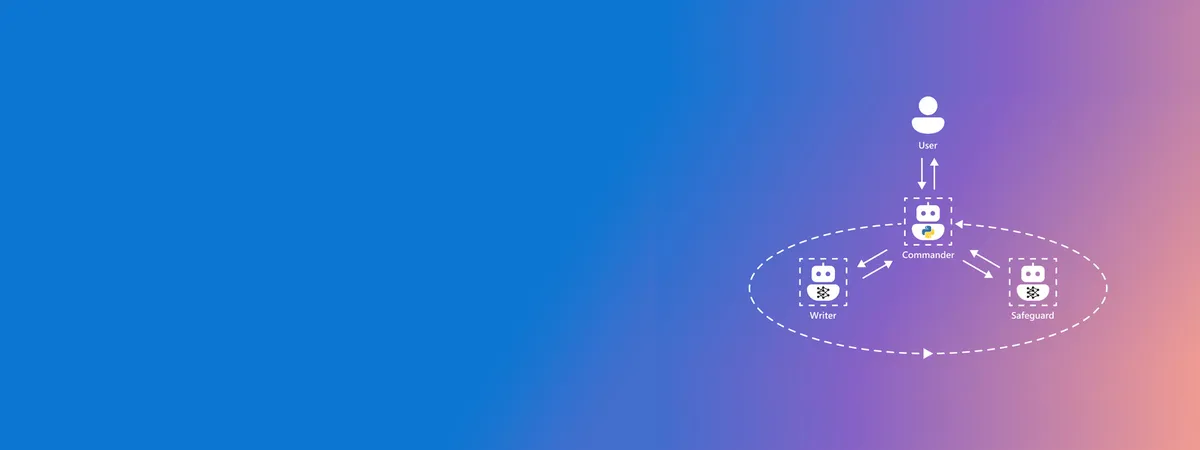
Image: Microsoft AutoGen documentation home, used for editorial coverage of the framework taught in this tutorial.
Status check (May 2026)
Before you spend an hour on this, the framework’s situation is worth surfacing. As of October 2025, Microsoft moved AutoGen to maintenance mode and the official microsoft/autogen README directs new users to Microsoft Agent Framework as the recommended successor 1 . Microsoft Agent Framework 1.0 reached general availability on 3 April 2026 2 . The v0.2 community fork lives on as AG2 at ag2ai/ag2, which continues active development with full back-compat for v0.2-era code 3 .
Practically, that gives you three live paths in May 2026:
autogen-agentchatfrom Microsoft (this tutorial). Maintenance mode, bug fixes and security patches only, no new features. Good for learning the conversational multi-agent pattern; safe for prototypes; evaluate Agent Framework before committing to production.ag2from the AG2 community (pip install ag2). Continues the v0.2 lineage with active feature work. Different API fromautogen-agentchat; pick this if you have v0.2 code to maintain or want a community-governed framework.- Microsoft Agent Framework. Microsoft’s recommended path for new production projects. Different mental model (closer to Semantic Kernel agent primitives) and worth a separate evaluation if production hardening is the priority.
This tutorial uses autogen-agentchat because the conversational group-chat pattern it ships is still the cleanest way to learn how multi-agent loops work. The concepts transfer to AG2 and Agent Framework with API rewriting; the mental model is the reusable part.
What you’ll need
Microsoft AutoGen is the multi-agent framework where the agents talk to each other to solve a task. The framing is conversational: you set up two or more agents, give them roles, and let them refine the answer through back-and-forth. By the end of this tutorial you will have a small research crew that takes a topic, drafts a short brief, and reviews its own work, all in Python.
This guide targets autogen-agentchat v0.4 onward (current PyPI release: 0.7.x as of May 2026) 4 . The v0.4 milestone is when Microsoft renamed and split the project into the three packages autogen-core, autogen-agentchat, and autogen-ext. We focus on autogen-agentchat because it gives you the high-level agent and group-chat primitives without forcing you to wire low-level event handlers.
You should be comfortable with Python 3.10 or later, virtual environments, and reading async code. You do not need prior agent-framework experience. If you have used CrewAI or LangGraph, the comparison section near the end places AutoGen against both.
You will need an LLM API key. The examples use OpenAI’s gpt-4o-mini for the cost. If you prefer Anthropic Claude, two paths are documented below: a quick OpenAI-compatibility swap for testing, and the production-grade native client for anything beyond exploration.
Budget about 60 minutes start to finish: 10 to install, 10 to configure the model, 30 to build and run the crew, and 10 to read the trace and tweak.
Time required
Around 60 minutes for a first run. Plan another 30 if you want to swap in Anthropic Claude or add a custom tool to one of the agents.
Steps
1. Set up a virtual environment and install autogen-agentchat
Create a fresh project folder, then a virtual environment. Activate it before installing anything so the packages do not leak into your system Python.
mkdir autogen-research-crew && cd autogen-research-crew
python3 -m venv .venv
source .venv/bin/activate # Windows: .venv\Scripts\activate
pip install --upgrade pip
pip install "autogen-agentchat>=0.7" "autogen-ext[openai]>=0.7"
Pinning to >=0.7 keeps you on the current release stream (0.7.x as of May 2026) and avoids resolving back to a stale 0.4.x build. The autogen-ext[openai] extra pulls in the OpenAI-compatible model client, which is also what AutoGen reuses when you call Anthropic’s OpenAI-compatibility endpoint. For production Anthropic use, install the native client extra documented in Step 2 instead.
Verify the install:
python -c "import autogen_agentchat; print(autogen_agentchat.__version__)"You should see a version string of 0.7.x or later (anything below 0.4 is the legacy line and not what this tutorial covers). If you see an ImportError, the most common cause is the older pyautogen package being on the path; uninstall it with pip uninstall pyautogen and try again. See “Common pitfalls” below for the full picture on which AutoGen-named package is which.
Image: AutoGen GitHub repository, used for editorial coverage of the framework’s package layout.
2. Configure the LLM client
Export your API key as an environment variable. AutoGen’s OpenAI client reads OPENAI_API_KEY by default 7 .
export OPENAI_API_KEY="sk-..." # bash / zsh
# Windows PowerShell:
# $env:OPENAI_API_KEY = "sk-..."
Create crew.py in the project root and start with the model client:
# crew.py
import asyncio
from autogen_ext.models.openai import OpenAIChatCompletionClient

model_client = OpenAIChatCompletionClient(
 model="gpt-4o-mini",
 # api_key picks up OPENAI_API_KEY automatically; pass explicitly
 # if you store it in a secrets manager.
)
To use Anthropic Claude, you have two paths. For learning and quick comparison, point the OpenAI client at Anthropic’s compatibility endpoint:
model_client = OpenAIChatCompletionClient(
    model="claude-sonnet-4-5-20250929",
    base_url="https://api.anthropic.com/v1/",
    api_key="<your-anthropic-key>",
    model_info={
        "vision": True,
        "function_calling": True,
        "json_output": True,
        "family": "claude",
    },
)
The model_info block is required when you use a non-OpenAI model string because AutoGen needs you to declare the model’s capabilities explicitly — it raises a ValueError otherwise. Set vision: True for Sonnet 4.5; the model supports image inputs per Anthropic’s models overview 5 .
Anthropic explicitly flags this compatibility layer as test-and-compare, not production-grade: their own documentation says it “is primarily intended to test and compare model capabilities, and is not considered a long-term or production-ready solution for most use cases” 6 . Translation: fine for this tutorial, fine for spike comparisons against your existing OpenAI code, not the path to ship on.
For production, AutoGen ships a native Anthropic client. Install the extra and import the dedicated class:
pip install "autogen-ext[anthropic]>=0.7"from autogen_ext.models.anthropic import AnthropicChatCompletionClient
model_client = AnthropicChatCompletionClient(
model="claude-sonnet-4-5-20250929",
# api_key picks up ANTHROPIC_API_KEY automatically
)The native client speaks Anthropic’s API directly, avoids the compatibility-layer hedges, and removes the model_info boilerplate. The rest of this tutorial works without further changes either way — the agent and group-chat layers are model-client-agnostic.
3. Define your first AssistantAgent
AssistantAgent is the workhorse class. It wraps the model client, holds a system prompt, and exposes an on_messages method the framework calls during a conversation. Below is the researcher in our crew.
from autogen_agentchat.agents import AssistantAgent

researcher = AssistantAgent(
    name="researcher",
    model_client=model_client,
    system_message=(
        "You are a careful research assistant. Given a topic, "
        "produce a 5-bullet brief covering: definition, current "
        "state, two named examples, one open question, and one "
        "credible source the reader can verify. Reference sources "
        "by publication name in the prose itself; do not "
        "fabricate URLs."
    ),
)
Two things matter here. First, the name is what other agents see in the conversation transcript, so keep it short and lowercase. Second, the system_message is your contract with the agent. AutoGen does not police outputs; if you want short, structured briefs, ask for them explicitly.
4. Add a reviewer agent and a termination signal
A solo agent is just a chat completion. The value of AutoGen shows up when a second agent challenges the first. Add a reviewer with a sharper system prompt and a stop signal so the conversation terminates cleanly.
reviewer = AssistantAgent(
    name="reviewer",
    model_client=model_client,
    system_message=(
        "You are a skeptical reviewer. Read the researcher's "
        "brief. Flag any claim that lacks a named source, any "
        "vague phrasing, and any factual gap. If the brief is "
        "solid, reply with 'APPROVED' and nothing else. "
        "Otherwise return a numbered revision list."
    ),
)
The reviewer’s “APPROVED” token is how we will tell the group chat it can stop. We will wire that in next.
Image: AutoGen AgentChat user guide, used for editorial coverage of the AssistantAgent and team primitives.
5. Wire a RoundRobinGroupChat
Group chats orchestrate the back-and-forth. RoundRobinGroupChat is the simplest pattern: each agent speaks in turn until a termination condition fires 8 . Add the imports and the team setup:
from autogen_agentchat.teams import RoundRobinGroupChat
from autogen_agentchat.conditions import TextMentionTermination, MaxMessageTermination

# Stop when the reviewer says APPROVED, or after 6 messages
# (researcher + reviewer x 3 rounds), whichever comes first.
termination = TextMentionTermination("APPROVED") | MaxMessageTermination(6)

team = RoundRobinGroupChat(
    participants=[researcher, reviewer],
    termination_condition=termination,
)
The | operator combines termination conditions with OR semantics. MaxMessageTermination(6) is your safety net: if the reviewer never approves, the loop still exits instead of burning tokens forever. Set it lower for cheap models, higher for tasks that genuinely need iteration.
Image: AutoGen documentation home, used for editorial coverage of the team orchestration primitives in this step.
6. Run the team and stream the conversation
AutoGen’s runtime is async. Wrap the run in asyncio.run and use Console from autogen_agentchat.ui to print the live transcript while the agents work:
from autogen_agentchat.ui import Console

async def main() -> None:
    task = (
        "Brief me on the current state of small language models "
        "(SLMs) under 10B parameters for on-device deployment in "
        "India, as of 2026."
    )
    await Console(team.run_stream(task=task))
    await model_client.close()

if __name__ == "__main__":
    asyncio.run(main())
Run it:
python crew.pyYou should see the researcher post a 5-bullet brief, the reviewer respond with either “APPROVED” or a numbered revision list, and the conversation either terminate or continue for one more researcher turn. On gpt-4o-mini, the full run typically costs a fraction of a cent.
7. Inspect the transcript and tweak
team.run_stream() yields each message as it is produced. To capture the full transcript without the live UI, replace the Console wrapper with a manual loop:
result = await team.run(task=task)
for message in result.messages:
    print(f"[{message.source}] {message.content}")
print(f"\nstop reason: {result.stop_reason}")
The stop_reason is the human-readable string you saw fire. If it reads “Maximum number of messages 6 reached”, your reviewer never approved; tighten the researcher’s system prompt or relax the reviewer’s bar.
Two common iterations:
- Add a third role. A “summariser” agent that takes the approved brief and rewrites it for a different audience is a good drop-in. Add it to the participant list and let
RoundRobinGroupChatrotate through three speakers. - Give the researcher a tool. Pass a Python callable to
AssistantAgent’stools=argument and the model can invoke it during the conversation. Useful for live web search through a wrapper of your choice; the AgentChat user guide documents the tool-calling API in full.
Common pitfalls
The package landscape trips up most first-time users because four different things wear the AutoGen name. Quick map:
autogen-agentchat(Microsoft, this tutorial). Maintenance mode as of October 2025; current PyPI line is 0.7.x. This is the v0.4 rename of the original project.pyautogen(legacy). The v0.2 line under its original name. Different API. If you copy code from a 2024 tutorial that imports frompyautogenorautogen(without the_agentchatsuffix), it will not run onautogen-agentchat. Microsoft’s migration guide is the canonical reference for translating between the two.ag2(community fork). Continuation of the v0.2 lineage with active development. Install separately withpip install ag2. Different package, different API namespace, different governance. Pick this if you want the v0.2 mental model and a maintained library.- Microsoft Agent Framework (Microsoft’s recommended successor). Different framework entirely; install via its own SDK, not via
autogen-*. This is the path Microsoft now points new production projects at.
If pip install autogen-agentchat succeeds but you see an ImportError, the most common cause is pyautogen already on the path. Uninstall it with pip uninstall pyautogen and try again.
Forgetting to close the model client leaves connections open. The await model_client.close() line at the end of main() is not optional; in long-running notebooks you will eventually hit a connection-pool warning without it.
Termination conditions are easy to misconfigure. If you only set TextMentionTermination("APPROVED") without a MaxMessageTermination ceiling, a stubborn reviewer can loop until your token budget runs out. Always pair the two.
System prompts that ask for “concise” or “thorough” output without a structural target produce wildly inconsistent responses. Specify the exact shape you want, the way the researcher’s prompt above asks for “5 bullets covering definition, current state, two named examples, one open question, one source”.
When to use a different approach
AutoGen’s strength is conversational refinement: tasks where two or more agents naturally disagree, critique, and converge on a better answer. If your workflow is single-agent or strictly sequential, you are paying for orchestration overhead you do not need. Reach for Smolagents for single-agent code execution; it is simpler and faster.
CrewAI is the closer competitor. It uses role-based agents with explicit task delegation rather than open conversation, which works better when each agent has a clearly bounded job and you want predictable hand-offs. CrewAI’s Crew and Task primitives map onto org-chart workflows; AutoGen’s group chats map onto editorial-meeting workflows.
LangGraph takes a graph-based approach: you define nodes and edges, and state flows through the graph deterministically. LangGraph is the right pick when you need branching logic, retries, and explicit control over which agent runs next. Pick it when “the next step depends on the last step’s output in a non-trivial way” and you want that logic visible in code, not implicit in agent prompts.
The short heuristic: AutoGen for back-and-forth refinement, CrewAI for role-driven pipelines, LangGraph for stateful workflows with branching. There is real overlap, and all three can solve most tasks; the choice is about which mental model your team will maintain six months from now.
Where to go next
Image: AutoGen GitHub repository, used for editorial coverage of the sample patterns referenced in this section.
The AgentChat user guide on Microsoft’s documentation site is the canonical reference for tool calls, custom termination conditions, and the lower-level autogen-core event-driven runtime if you outgrow RoundRobinGroupChat. The GitHub repository’s python/samples/ directory has a dozen runnable examples covering coding agents, data-analysis crews, and human-in-the-loop patterns.
If you want to ship something built on this tutorial, two natural next steps are: wrap the crew in a FastAPI endpoint so a web app can post topics, and add a UserProxyAgent that pauses for human input between rounds. Both patterns are documented in the AgentChat user guide.
How this article was made: an autonomous AI pipeline researched, drafted, fact-checked, and reviewed this piece, aggregating publicly-available information from the sources consulted below. AI (artificial intelligence) can make mistakes, so please cross-check the consulted sources before acting on anything here. Neural Tech Daily is not liable for decisions or outcomes based on this article.
Sources consulted
Cited Sources
- 1. microsoft/autogen GitHub README — maintenance-mode notice (October 2025) and direction to Microsoft Agent Framework as the recommended successor (accessed ) ↩
- 2. Microsoft Agent Framework overview (Microsoft Learn) — 1.0 general availability, 3 April 2026 (accessed ) ↩
- 3. ag2ai/ag2 GitHub repository — community fork continuing the v0.2 lineage with active development (accessed ) ↩
- 4. autogen-agentchat on PyPI — current 0.7.x release stream and v0.4-onward release history; documents the package split into autogen-core / autogen-agentchat / autogen-ext (accessed ) ↩
- 5. Claude models overview — Sonnet 4.5 vision support documented in the model capabilities table (accessed ) ↩
- 6. Anthropic OpenAI SDK compatibility documentation — explicit production-readiness hedge ("primarily intended to test and compare model capabilities, and is not considered a long-term or production-ready solution for most use cases") (accessed ) ↩
- 7. AutoGen AgentChat user guide — model client configuration and OPENAI_API_KEY environment variable (accessed ) ↩
- 8. AutoGen AgentChat user guide — RoundRobinGroupChat and termination conditions (accessed ) ↩
Further Reading
- Microsoft AutoGen documentation home (accessed )
- autogen-ext on PyPI (anthropic extra → AnthropicChatCompletionClient) (accessed )
Anonymous · no cookies set